// ============================================================
// Hattie — Mockups: WhatsApp atoms, interactive HeroPhone,
// compact workflow snippets, Slack thread
// ============================================================

/* ============================================================
   WhatsApp atoms
   ============================================================ */

const WAHeader = ({ name, status = "online", tag, inPhone }) => (
  <div className="wa__header">
    <div className="wa__avatar">{(name || "").split(" ").map(w => w[0]).slice(0, 2).join("")}</div>
    <div className="wa__contact">
      <div className="wa__name">
        {name}
        {tag && <span className="wa__hattie-tag">{tag}</span>}
      </div>
      <div className="wa__status">{status}</div>
    </div>
    {!inPhone && (
      <div className="wa__header-actions">
        <Icon name="video" size={20}/>
        <Icon name="phone" size={20}/>
        <Icon name="more" size={20}/>
      </div>
    )}
  </div>
);

const WABubble = ({ side = "received", first, time, ticks, children, style, className }) => {
  const cls = [
    "wa__bubble",
    `wa__bubble--${side}`,
    first && `wa__bubble--first-${side}`,
    className,
  ].filter(Boolean).join(" ");
  return (
    <div className={cls} style={style}>
      {children}
      {time && (
        <span className="wa__bubble-meta">
          {time}
          {ticks && side === "sent" && <Icon name="check-double" size={14}/>}
        </span>
      )}
    </div>
  );
};

const WAThread = ({ contact, status, tag, compact, showComposer, dayStamp, children, inPhone, style, threadRef }) => (
  <div className={`wa ${compact ? "wa--compact" : ""}`} style={style}>
    <WAHeader name={contact} status={status} tag={tag} inPhone={inPhone}/>
    <div className="wa__thread" ref={threadRef}>
      {dayStamp && <div className="wa__day-stamp">{dayStamp}</div>}
      {children}
    </div>
  </div>
);

/* ============================================================
   HERO PHONE — interactive WhatsApp brief with chip-row reply
   ============================================================ */

const HERO_ITEMS = [
  {
    id: "pricing",
    body: "Pricing watch on Lakeshore 2BR. Comps are sitting at $300, you're at $340. Want me to run a promotion that drops it to $300 for the next two weeks?",
    acks: {
      "Go":            "Setting up a 14-day Airbnb promotion at $300. Live in 60 seconds.",
      "Change to 310": "Got it. Running the promotion at $310 instead. Live in 60 seconds.",
      "Keep it":       "Holding. I'll resurface tomorrow if comps stay below.",
    },
  },
];

const CHIPS = ["Go", "Change to 310", "Keep it"];

const AIRCOVER_UPDATE = "Quick FYI. The Aircover claim from apt 12B (broken lamp) came back. $340 refunded, landed in your account this morning.";

const HeroBubbleGreeting = ({ time }) => (
  <WABubble side="received" first time={time}>
    Morning, Sam. Today's brief.
  </WABubble>
);

const HeroBubbleSummary = ({ time }) => (
  <WABubble side="received" time={time} style={{ maxWidth: "85%" }}>
    <div style={{ fontWeight: 500, marginBottom: 6, color: "var(--ink)" }}>Tuesday, May 28</div>
    <div style={{ fontSize: 13, lineHeight: 1.65, color: "#3a3a3a" }}>
      <div><strong>1</strong> needs your eyes</div>
      <div><strong>5</strong> stays in progress</div>
      <div><strong>1</strong> Aircover update</div>
    </div>
  </WABubble>
);

const HeroBubbleItem = ({ item, time, dim }) => (
  <WABubble
    side="received"
    first
    time={time}
    style={{ maxWidth: "88%", opacity: dim ? 0.7 : 1, transition: "opacity 240ms var(--ease-out)" }}
  >
    <div style={{ fontSize: 13.5, lineHeight: 1.55, color: "var(--ink)" }}>
      {item.body}
    </div>
  </WABubble>
);

const HeroBubbleUser = ({ text, time }) => (
  <WABubble side="sent" first time={time} ticks className="hero-bubble-enter">
    {text}
  </WABubble>
);

const HeroBubbleAck = ({ text, time }) => (
  <WABubble side="received" first time={time} className="hero-bubble-enter">
    {text}
  </WABubble>
);

const HeroBubbleUpdate = ({ text, time }) => (
  <WABubble side="received" first time={time} className="hero-bubble-enter" style={{ maxWidth: "88%" }}>
    {text}
  </WABubble>
);

const HeroBubbleFinal = ({ time }) => (
  <WABubble side="received" first time={time} className="hero-bubble-enter" style={{ maxWidth: "85%" }}>
    Let me know if you need anything else.
  </WABubble>
);

const initialState = () => ({
  // Each bubble has: kind, key, time, item?, text?
  bubbles: [
    { kind: "greeting", key: "g", time: "8:00 AM" },
    { kind: "summary",  key: "s", time: "8:00 AM" },
    { kind: "item",     key: "i0", time: "8:00 AM", itemIdx: 0 },
  ],
  activeItemIdx: 0,
  phase: "awaiting", // awaiting | typing | sending | acking | nextLoading | done
  pulseHinted: true,
  inputText: "",
  hattieTyping: false,
});

const TIME_FOR_ITEM = (idx) => ["8:00 AM", "8:01 AM"][idx] || "8:02 AM";

const HeroPhone = () => {
  const [state, setState] = React.useState(initialState);
  const threadRef = React.useRef(null);
  const timeoutsRef = React.useRef([]);

  const setTimer = (fn, ms) => {
    const t = setTimeout(fn, ms);
    timeoutsRef.current.push(t);
    return t;
  };
  const clearTimers = () => {
    timeoutsRef.current.forEach(clearTimeout);
    timeoutsRef.current = [];
  };

  // Auto-scroll thread on bubble change
  React.useEffect(() => {
    if (threadRef.current) {
      threadRef.current.scrollTop = threadRef.current.scrollHeight + 999;
    }
  }, [state.bubbles, state.hattieTyping]);

  React.useEffect(() => () => clearTimers(), []);

  const handleChip = (chipText) => {
    if (state.phase !== "awaiting") return;
    // 1) Animate text into input bar
    setState(s => ({ ...s, phase: "typing", inputText: chipText, pulseHinted: false }));

    // 2) After 420ms: clear input, push user bubble
    setTimer(() => {
      setState(s => {
        const idx = s.activeItemIdx;
        const ackTime = TIME_FOR_ITEM(idx);
        return {
          ...s,
          inputText: "",
          phase: "sending",
          bubbles: [...s.bubbles, { kind: "user", key: `u${idx}`, time: ackTime, text: chipText }],
        };
      });

      // 3) After 380ms: Hattie typing indicator
      setTimer(() => {
        setState(s => ({ ...s, hattieTyping: true, phase: "acking" }));

        // 4) After 720ms: ack bubble
        setTimer(() => {
          setState(s => {
            const idx = s.activeItemIdx;
            const item = HERO_ITEMS[idx];
            const ack = item.acks[chipText];
            const ackTime = TIME_FOR_ITEM(idx);
            return {
              ...s,
              hattieTyping: false,
              bubbles: [...s.bubbles, { kind: "ack", key: `a${idx}`, time: ackTime, text: ack }],
            };
          });

          // 5) After 800ms: aircover update (passive), then 1200ms: brief cleared
          setTimer(() => {
            setState(s => ({
              ...s,
              phase: "updating",
              bubbles: [...s.bubbles, { kind: "update", key: "aircover-update", time: "8:02 AM", text: AIRCOVER_UPDATE }],
            }));
            setTimer(() => {
              setState(s => ({
                ...s,
                phase: "done",
                bubbles: [...s.bubbles, { kind: "final", key: "final", time: "8:02 AM" }],
              }));
            }, 1200);
          }, 800);
        }, 720);
      }, 380);
    }, 420);
  };

  const handleReplay = () => {
    clearTimers();
    setState(initialState());
  };

  const phase = state.phase;
  const inputPlaceholder = phase === "typing" ? state.inputText : "Reply to Hattie…";

  return (
    <div className="phone" role="region" aria-label="Hattie's morning brief, on WhatsApp">
      <div className="phone__notch"/>
      <div className="phone__screen">
        <WAThread
          contact="Hattie"
          status={state.hattieTyping ? "typing…" : "online"}
          tag="ops"
          inPhone
          dayStamp="Today"
          threadRef={threadRef}
        >
          {state.bubbles.map(b => {
            if (b.kind === "greeting") return <HeroBubbleGreeting key={b.key} time={b.time}/>;
            if (b.kind === "summary")  return <HeroBubbleSummary key={b.key} time={b.time}/>;
            if (b.kind === "item") {
              const dim = b.itemIdx < state.activeItemIdx || (b.itemIdx === state.activeItemIdx && state.phase !== "awaiting" && state.phase !== "typing");
              return <HeroBubbleItem key={b.key} item={HERO_ITEMS[b.itemIdx]} time={b.time} dim={dim}/>;
            }
            if (b.kind === "user")   return <HeroBubbleUser   key={b.key} text={b.text} time={b.time}/>;
            if (b.kind === "ack")    return <HeroBubbleAck    key={b.key} text={b.text} time={b.time}/>;
            if (b.kind === "update") return <HeroBubbleUpdate key={b.key} text={b.text} time={b.time}/>;
            if (b.kind === "final")  return <HeroBubbleFinal  key={b.key} time={b.time}/>;
            return null;
          })}
          {state.hattieTyping && (
            <div className="wa__bubble wa__bubble--received wa__bubble--first-received hero-typing">
              <span/><span/><span/>
            </div>
          )}
        </WAThread>

        {/* Suggested-reply row + input bar at the bottom of the screen */}
        <div className="hero-input">
          {phase !== "done" && (
            <>
              <div className="hero-chips-label">Tap a message</div>
              <div className="hero-chips" aria-label="Suggested replies">
                {CHIPS.map((c, i) => (
                  <button
                    key={c}
                    type="button"
                    className={`hero-chip ${i === 0 && state.pulseHinted ? "hero-chip--pulse" : ""}`}
                    onClick={() => handleChip(c)}
                    disabled={phase !== "awaiting"}
                  >
                    <span className="hero-chip__label">{c}</span>
                    <span className="hero-chip__arrow" aria-hidden>
                      <Icon name="arrow-up" size={14} strokeWidth={2}/>
                    </span>
                  </button>
                ))}
              </div>
            </>
          )}
          {phase === "done" && (
            <div className="hero-chips">
              <button type="button" className="hero-chip" onClick={handleReplay}>
                <span className="hero-chip__label">Replay</span>
                <span className="hero-chip__arrow" aria-hidden>
                  <Icon name="arrow-up" size={14} strokeWidth={2}/>
                </span>
              </button>
            </div>
          )}
          <div className="hero-composer">
            <Icon name="smile" size={20} style={{ color: "#7E8B95", flex: "none" }}/>
            <div className={`hero-composer-input ${phase === "typing" ? "hero-composer-input--typing" : ""}`}>
              {phase === "typing" ? state.inputText : <span className="hero-composer-placeholder">Reply to Hattie…</span>}
            </div>
            <Icon name="paperclip" size={20} style={{ color: "#7E8B95", flex: "none" }}/>
            <div className="hero-composer-mic" aria-hidden>
              <Icon name="mic" size={18}/>
            </div>
          </div>
        </div>
      </div>
    </div>
  );
};

/* ============================================================
   COMPACT WORKFLOW SNIPPETS — for the Three Workflows section
   ============================================================ */

/* Snippet 1: Aircover — cleaner sends carpet stain photo */
const SnippetAircover = () => (
  <div className="wa wa--snippet">
    <WAHeader name="Rosa · cleaner" status="online" tag="Hattie"/>
    <div className="wa__thread">
      <WABubble side="received" first>
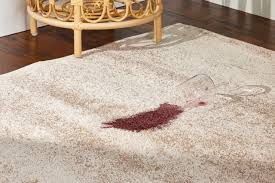
        carpet has a big wine stain. wasn't there before
        <span className="wa__bubble-meta" style={{ color: "#667781" }}>10:14</span>
      </WABubble>
      <WABubble side="received">
        <img
          src="assets/carpet-stain.png"
          alt="Wine stain on the living room carpet next to a knocked-over glass"
          style={{ width: 200, height: 130, objectFit: "cover", borderRadius: 6, display: "block", marginBottom: 4 }}
        />
        <span className="wa__bubble-meta" style={{ color: "#667781" }}>10:14</span>
      </WABubble>
      <WABubble side="sent" first time="10:17" ticks>
        Got it. Filing the claim now. $220.
      </WABubble>
    </div>
  </div>
);

/* Snippet 2: Pricing — Airbnb-style listing grid with comp rates */
const SnippetPricing = () => {
  const comps = [
    {
      name: "Lake View 2BR",
      area: "Lake District",
      rating: "4.92",
      rate: 118,
      photo: "https://images.unsplash.com/photo-1505693416388-ac5ce068fe85?w=480&h=480&fit=crop&q=80",
    },
    {
      name: "Your listing",
      area: "Lakeshore",
      rating: "4.89",
      rate: 158,
      you: true,
      photo: "https://images.unsplash.com/photo-1502672260266-1c1ef2d93688?w=480&h=480&fit=crop&q=80",
    },
  ];
  return (
    <div className="ab-pricing">
      <div className="ab-pricing__topbar">
        <div className="ab-pricing__search">
          <svg width="14" height="14" viewBox="0 0 24 24" fill="none" stroke="#222" strokeWidth="2" strokeLinecap="round" strokeLinejoin="round" aria-hidden><circle cx="11" cy="11" r="8"/><line x1="21" y1="21" x2="16.65" y2="16.65"/></svg>
          <div className="ab-pricing__search-text">
            <div className="ab-pricing__search-where">Lakeshore · 0.5 mi</div>
            <div className="ab-pricing__search-when">May 30 – Jun 13 · 2 guests</div>
          </div>
        </div>
        <div className="ab-pricing__filters" aria-hidden>
          <svg width="14" height="14" viewBox="0 0 24 24" fill="none" stroke="#222" strokeWidth="2" strokeLinecap="round" strokeLinejoin="round"><line x1="4" y1="21" x2="4" y2="14"/><line x1="4" y1="10" x2="4" y2="3"/><line x1="12" y1="21" x2="12" y2="12"/><line x1="12" y1="8" x2="12" y2="3"/><line x1="20" y1="21" x2="20" y2="16"/><line x1="20" y1="12" x2="20" y2="3"/><line x1="1" y1="14" x2="7" y2="14"/><line x1="9" y1="8" x2="15" y2="8"/><line x1="17" y1="16" x2="23" y2="16"/></svg>
        </div>
      </div>

      <div className="ab-pricing__grid">
        {comps.map((c, i) => (
          <div key={i} className={`ab-card ${c.you ? "ab-card--you" : ""}`}>
            <div className="ab-card__photo" style={{ backgroundImage: `url(${c.photo})`, backgroundSize: "cover", backgroundPosition: "center" }}>
              <button className="ab-card__heart" aria-label="Save" type="button">
                <svg width="14" height="14" viewBox="0 0 24 24" fill={c.you ? "#FF385C" : "rgba(0,0,0,0.45)"} stroke="#fff" strokeWidth="2" aria-hidden>
                  <path d="M20.84 4.61a5.5 5.5 0 0 0-7.78 0L12 5.67l-1.06-1.06a5.5 5.5 0 0 0-7.78 7.78l1.06 1.06L12 21.23l7.78-7.78 1.06-1.06a5.5 5.5 0 0 0 0-7.78z"/>
                </svg>
              </button>
              {c.you && <div className="ab-card__badge">Your listing</div>}
            </div>
            <div className="ab-card__row">
              <span className="ab-card__title">{c.name}</span>
              <span className="ab-card__rating">
                <svg width="10" height="10" viewBox="0 0 24 24" fill="#222" aria-hidden><polygon points="12 2 15.09 8.26 22 9.27 17 14.14 18.18 21.02 12 17.77 5.82 21.02 7 14.14 2 9.27 8.91 8.26 12 2"/></svg>
                {c.rating}
              </span>
            </div>
            <div className="ab-card__area">{c.area}</div>
            <div className="ab-card__price">
              <strong>${c.rate}</strong> <span className="ab-card__per">night</span>
            </div>
          </div>
        ))}
      </div>

      <div className="ab-pricing__proposal">
        <div className="ab-pricing__proposal-left">
          <div className="ab-pricing__proposal-label">Hattie's read</div>
          <div className="ab-pricing__proposal-text">Comps median <strong>$128</strong>. You're <strong>$30 above</strong>.</div>
        </div>
        <div className="ab-pricing__proposal-arrow">
          <span className="ab-pricing__strike">$158</span>
          <Icon name="arrow-right" size={14} style={{ color: "var(--ink-tertiary)" }}/>
          <strong>$128</strong>
        </div>
      </div>
    </div>
  );
};

/* Snippet 3: Guest reply — Airbnb messaging UI, 18-min unread + Hattie's draft */
const SnippetGuestReply = () => (
  <div className="ab">
    <div className="ab__topbar">
      <div className="ab__back" aria-hidden>
        <svg width="16" height="16" viewBox="0 0 24 24" fill="none" stroke="currentColor" strokeWidth="2" strokeLinecap="round" strokeLinejoin="round"><polyline points="15 18 9 12 15 6"/></svg>
      </div>
      <div className="ab__brand" aria-label="Airbnb">
        <svg width="18" height="18" viewBox="0 0 32 32" fill="#FF385C" aria-hidden>
          <path d="M16 1C8 1 4 8 4 14c0 5 3 9 6 13 2 3 4 4 6 4s4-1 6-4c3-4 6-8 6-13 0-6-4-13-12-13zm0 19a4 4 0 1 1 0-8 4 4 0 0 1 0 8z"/>
        </svg>
      </div>
      <div className="ab__topbar-spacer"/>
      <div className="ab__menu" aria-hidden>⋯</div>
    </div>

    <div className="ab__listing">
      <div className="ab__listing-thumb" aria-hidden>
        <div className="ab__listing-thumb-tile" style={{ background: "linear-gradient(135deg,#C9B89E 0%,#8C7256 100%)" }}/>
      </div>
      <div className="ab__listing-info">
        <div className="ab__listing-name">Lakeshore 2BR · Lake view</div>
        <div className="ab__listing-meta">May 27 – 30 · 2 guests</div>
      </div>
    </div>

    <div className="ab__thread">
      <div className="ab__sender-row">
        <div className="ab__avatar">M</div>
        <div className="ab__sender-name">Marta</div>
        <div className="ab__sender-time">2:23 PM</div>
      </div>
      <div className="ab__bubble ab__bubble--guest">
        Hi! Just arrived, what's the wifi password? Can't find it on the welcome card.
      </div>

      <div className="ab__unread">
        <span className="ab__unread-dot"/>
        Unread · 18 min
      </div>

      <div className="ab__hattie-draft">
        <div className="ab__hattie-head">
          <div className="ab__hattie-avatar">h</div>
          <div>
            <div className="ab__hattie-name">Hattie drafted a reply</div>
            <div className="ab__hattie-sub">Pulled from your wifi SOP</div>
          </div>
        </div>
        <div className="ab__hattie-body">
          Hi Marta. The network is <strong>lakeshore-guest</strong>, password <strong>BluePine24</strong>. Also taped behind the router in the living room console.
        </div>
        <div className="ab__hattie-actions">
          <button className="ab__hattie-btn ab__hattie-btn--primary" type="button">
            <Icon name="arrow-up" size={12} strokeWidth={2}/> Send
          </button>
          <button className="ab__hattie-btn" type="button">Edit</button>
        </div>
      </div>
    </div>
  </div>
);

/* ============================================================
   SLACK MOCKUP (unchanged — full-functionality, smaller column)
   ============================================================ */

const SlackThread = () => (
  <div className="sl" style={{ minHeight: 480 }}>
    <aside className="sl__sidebar">
      <div className="sl__workspace">
        <span className="sl__workspace-name">Lakeshore Rentals</span>
        <span className="sl__workspace-status"/>
      </div>
      <div className="sl__nav-group">
        <div className="sl__group-label">Channels <Icon name="plus" size={14}/></div>
        <div className="sl__channel-row">
          <span className="sl__channel-prefix">#</span> general
        </div>
        <div className="sl__channel-row sl__channel-row--active">
          <span className="sl__channel-prefix">#</span> hattie-brief
        </div>
        <div className="sl__channel-row sl__channel-row--unread">
          <span className="sl__channel-prefix">#</span> maintenance
          <span className="sl__badge">2</span>
        </div>
        <div className="sl__channel-row">
          <span className="sl__channel-prefix">#</span> aircover-claims
        </div>
        <div className="sl__channel-row">
          <span className="sl__channel-prefix">#</span> cleaners
        </div>
      </div>
      <div className="sl__nav-group">
        <div className="sl__group-label">Direct messages <Icon name="plus" size={14}/></div>
        <div className="sl__channel-row">
          <span style={{ width: 8, height: 8, borderRadius: 999, background: "#2BAC76", display: "inline-block" }}/> Hattie
        </div>
        <div className="sl__channel-row">
          <span style={{ width: 8, height: 8, borderRadius: 999, background: "transparent", border: "1px solid #BCABBC", display: "inline-block" }}/> Andrea (VA)
        </div>
        <div className="sl__channel-row">
          <span style={{ width: 8, height: 8, borderRadius: 999, background: "transparent", border: "1px solid #BCABBC", display: "inline-block" }}/> Joey (VA)
        </div>
      </div>
    </aside>
    <div className="sl__column">
      <div className="sl__channel-header">
        <Icon name="hash" size={18} style={{ color: "var(--ink-muted)" }}/>
        <div className="sl__channel-title">hattie-brief</div>
        <span className="sl__channel-divider">|</span>
        <span className="sl__channel-meta">Daily ops brief from Hattie</span>
      </div>
      <div className="sl__messages">

        <div className="sl__msg">
          <div className="sl__msg-avatar sl__msg-avatar--hattie">h</div>
          <div>
            <div className="sl__msg-head">
              <span className="sl__msg-name">Hattie</span>
              <span className="sl__msg-app-tag">APP</span>
              <span className="sl__msg-time">8:00 AM</span>
            </div>
            <div className="sl__msg-body">
              <p><strong>Morning brief, Tuesday, May 28</strong></p>
              <p style={{ marginTop: 4 }}>3 need your eyes, 5 stays in progress, 2 check-ins next 48h.</p>
              <div className="sl__msg-block">
                <strong>Aircover · apt 12B.</strong> Cleaner reported broken floor lamp ($340). Draft ready.<br/>
                <strong>Pricing · Lakeshore 2BR.</strong> 38% booked, $30 above comps. Drop proposed.<br/>
                <strong>Guest reply · booking GZL-7821.</strong> Wifi question, unread 18 min. Reply drafted.
              </div>
              <div className="sl__msg-actions">
                <button className="sl__msg-action sl__msg-action--primary">Open brief</button>
                <button className="sl__msg-action">Approve all</button>
              </div>
            </div>
          </div>
        </div>

        <div className="sl__msg">
          <div className="sl__msg-avatar" style={{ background: "#3F0E40" }}>SC</div>
          <div>
            <div className="sl__msg-head">
              <span className="sl__msg-name">Sam Calder</span>
              <span className="sl__msg-time">8:14 AM</span>
            </div>
            <div className="sl__msg-body">
              <p>File the lamp claim. Approve the price drop. Hold the wifi reply, I want to read it first.</p>
            </div>
          </div>
        </div>

        <div className="sl__msg">
          <div className="sl__msg-avatar sl__msg-avatar--hattie">h</div>
          <div>
            <div className="sl__msg-head">
              <span className="sl__msg-name">Hattie</span>
              <span className="sl__msg-app-tag">APP</span>
              <span className="sl__msg-time">8:14 AM</span>
            </div>
            <div className="sl__msg-body">
              <p>Filing claim now. Pushing the rate drop to Hostaway. Wifi reply on hold. Opening the draft for you.</p>
            </div>
          </div>
        </div>

        <div className="sl__msg">
          <div className="sl__msg-avatar sl__msg-avatar--hattie">h</div>
          <div>
            <div className="sl__msg-head">
              <span className="sl__msg-name">Hattie</span>
              <span className="sl__msg-app-tag">APP</span>
              <span className="sl__msg-time">8:23 AM</span>
            </div>
            <div className="sl__msg-body">
              <p>Claim filed, ref <span className="t-mono" style={{ background: "var(--surface-2)", padding: "1px 5px", borderRadius: 3 }}>AC-4821</span>. Rate drop live. I'll chase Airbnb support every 48h until resolution.</p>
            </div>
          </div>
        </div>

      </div>
      <div className="sl__composer">Message #hattie-brief</div>
    </div>
  </div>
);

Object.assign(window, {
  WAHeader, WABubble, WAThread,
  HeroPhone,
  SnippetAircover, SnippetPricing, SnippetGuestReply,
  SlackThread,
});
